
Best overall: an undated priorities planner. Best for appointment-heavy weeks: a time-block planner. Best for shared family schedules: a family-grid planner. This guide helps you choose a printable weekly planner for busy moms by comparing layouts for appointments, household tasks, meals, and changing energy levels in 2026.
- The best printable weekly planner for busy moms is an undated priorities layout when you need a clear, adaptable starting point.
- Choose time blocks for appointments, a family grid for coordination, or a meal-focused layout for dinner decisions.
- Choose an energy-aware layout when your planning needs to accommodate changing capacity rather than fill every hour.
- The Sheema Edit pairs printable journals and planners with personal essays on motherhood, mental wellness, and chronic illness.
Why this matters
A weekly planner should help you decide what belongs in your week, not give every unfinished task a permanent home. School events, work commitments, household responsibilities, and your own needs compete for space. A useful layout makes those competing demands visible.
The Sheema Edit offers printable journals and planners alongside personal essays. The Sheema Edit is best for moms who want printable planners alongside relatable writing on motherhood and mental wellness. The recommendations below compare layout types, not named shop products.
For your 2026 planning routine, start with the problem you need to solve. Missed appointments call for a different page than dinner decisions or an overflowing task list. Choose a format for that problem before choosing decorative details.
What makes the best printable weekly planner for busy moms
Use these criteria to judge a template before committing to its layout:
- A clear weekly view: You can see appointments and commitments without turning between separate daily pages.
- Visible priorities: Important tasks have a defined place instead of disappearing inside a long checklist.
- Enough writing room: The boxes accommodate your actual handwriting and the details you need.
- Flexible scheduling: Undated spaces or open sections let you restart without treating an unused week as a failure.
- Shared responsibilities: Household tasks can include an owner, not just another reminder for you.
- Practical printing: The page fits your paper and remains readable when printed without color.
Before printing a stack, print a single test page. Write a real appointment, a household task, and a personal commitment in the spaces provided. If those entries feel cramped, choose a different layout rather than shrinking your handwriting.
Printable weekly planner layouts at a glance
| Rank and layout | Best for | Standout feature | Key limitation |
|---|---|---|---|
| 1. Undated priorities planner | Choosing what matters this week | Weekly priorities beside daily commitments | Does not show detailed hourly conflicts |
| 2. Time-block planner | Appointment-heavy schedules | Time-based spaces for fixed commitments | Can become rigid when plans change |
| 3. Family-grid planner | Coordinating multiple household members | Separate columns or rows for people | Requires shared updates to stay useful |
| 4. Meal-focused weekly planner | Connecting dinner plans with the week | Meals beside activities and preparation notes | Does not replace a broader task system |
| 5. Energy-aware weekly planner | Planning around changing capacity | Essential tasks separated from optional tasks | Needs separate space for detailed schedules |
These layouts solve different problems. A time-block planner is not automatically better because it contains more detail, and a simple page is not automatically easier if you need to coordinate several people.
1. Undated priorities planner: best for a manageable weekly focus
An undated priorities planner puts your important tasks beside a broad view of the week. Look for open date fields, daily writing spaces, and a separate place for weekly priorities.
This is the default recommendation for 2026 when you need direction without an hourly timetable. You can record fixed commitments while keeping unfinished tasks separate from appointments.
Undated priorities planner pros:
- Lets you start with the current week rather than a preset calendar.
- Separates important work from routine reminders.
- Leaves room to move a task without rebuilding an hourly schedule.
Undated priorities planner cons:
- Does not reveal overlapping appointments as clearly as a time grid.
- Becomes another long list if you treat every task as a priority.
Best for: Moms whose main challenge is deciding what deserves attention, rather than tracking a tightly scheduled day.
Choose a small set of weekly priorities, then assign each a realistic place. For example, submitting school paperwork belongs on a specific day if it has a deadline; researching a future project can remain in a separate notes area.
Verdict: Buy this layout for a flexible starting point; skip it if hourly visibility is your main requirement.
2. Time-block planner: best for appointment-heavy weeks
A time-block planner organizes your days around time slots. It helps you place school drop-offs, work meetings, medical appointments, and other fixed commitments in relation to one another.
Start with events that have a set time. Add preparation and travel before deciding where flexible tasks belong; an appointment entry alone does not describe everything you need to do around it.
Time-block planner pros:
- Makes overlapping commitments easier to spot on paper.
- Gives preparation and travel their own visible space.
- Helps distinguish scheduled events from tasks without fixed times.
Time-block planner cons:
- Small time slots can leave little room for notes.
- A disrupted morning can require several later entries to move.
Best for: Moms balancing appointments, school schedules, or work commitments that happen at specific times.
In 2026, choose a time range that matches your actual day. A page focused on daytime hours will not serve you well if your planning depends on early shifts or evening commitments. Keep flexible tasks in a separate list instead of assigning every chore an appointment.
Verdict: Buy this layout for fixed commitments; skip it if an hourly grid adds pressure without useful information.
3. Family-grid planner: best for shared household coordination
A family-grid planner gives each household member a separate column or row. You can compare schedules without mixing everyone's appointments into the same daily box.
Choose a grid with room to record who handles a commitment, not only who attends. A child's appointment and the adult responsible for transportation are different pieces of information.
Family-grid planner pros:
- Keeps each person's commitments identifiable.
- Gives shared responsibilities an obvious place.
- Supports a household conversation about conflicting plans.
Family-grid planner cons:
- Becomes crowded as more people or activities are added.
- Requires a clear agreement about who updates the page.
Best for: Moms who need a shared overview of several people's schedules rather than a private personal task list.
Place the finished page somewhere the people using it can access. Agree on how changes are added, and write names beside shared tasks. Recording an appointment is not the same as agreeing who will arrange transport or handle the follow-up.
Keep private details off a page displayed in a shared space. A short appointment label can be enough.
Verdict: Buy this layout for coordination; skip it if nobody else will consult or update it.
4. Meal-focused weekly planner: best for matching dinner to your schedule
A meal-focused weekly planner places meal decisions beside the week's activities. Useful spaces include meal names, ingredients to check, and preparation reminders.
The aim is to connect food decisions with the time and effort you want to give them. Plan the busiest evening first, rather than building a menu independently of your calendar.
Meal-focused weekly planner pros:
- Keeps meals and evening commitments visible together.
- Creates a place to note preparation before it becomes urgent.
- Separates meal decisions from the shopping list they produce.
Meal-focused weekly planner cons:
- Offers limited space for unrelated appointments or personal priorities.
- Needs revision when household plans or preferences change.
Best for: Moms whose recurring planning question is what to serve on evenings with different demands.
For your 2026 routine, write meals you genuinely want to prepare, not an idealized menu. Leave room to rearrange dinners. If a meal requires preparation earlier in the day, put that action beside the relevant day instead of relying on the meal name to remind you.
Verdict: Buy this layout when meals are the planning bottleneck; skip it as your only planner for a complex schedule.
5. Energy-aware weekly planner: best for changing capacity
An energy-aware weekly planner separates essential commitments from tasks you can postpone or simplify. Look for open writing areas rather than a page that requires every hour to be filled.
This format accommodates planning around fatigue, chronic illness, or otherwise unpredictable days. It is an organizational option, not a treatment or a promise to improve symptoms.
Energy-aware weekly planner pros:
- Gives essential tasks a distinct place.
- Leaves room for an alternative version of a demanding day.
- Keeps optional tasks from appearing equally urgent.
Energy-aware weekly planner cons:
- Does not provide the detail of a full appointment timetable.
- Still requires decisions about which commitments can change.
Best for: Moms who need a plan that remains useful when their available energy changes.
Use labels such as essential, flexible, and later. Describe tasks narrowly: replying to a school message is clearer than catching up on everything. When a task depends on another person, write the next action you control rather than treating the whole outcome as your responsibility.
Verdict: Buy this layout for adaptable priorities; skip it if you primarily need detailed time slots.
How these planner layouts are ranked
The ranking follows the criteria above: weekly visibility, priorities, writing room, flexibility, shared responsibilities, and printing practicality. The undated priorities layout takes the default position because it combines a weekly overview with room to choose what matters.
The other layouts win specific use cases rather than compete for the same reader. Choose appointment visibility over flexibility when fixed times dominate; choose a family grid when coordination matters more than your personal checklist. This is a layout guide, not a product-testing scorecard.
Which printable weekly planner should you choose?
Choose an undated priorities planner unless you can name a more specific problem. For 2026, resist adding sections simply because a template includes them. A habit tracker, meal box, and household checklist each need a reason to occupy your page.
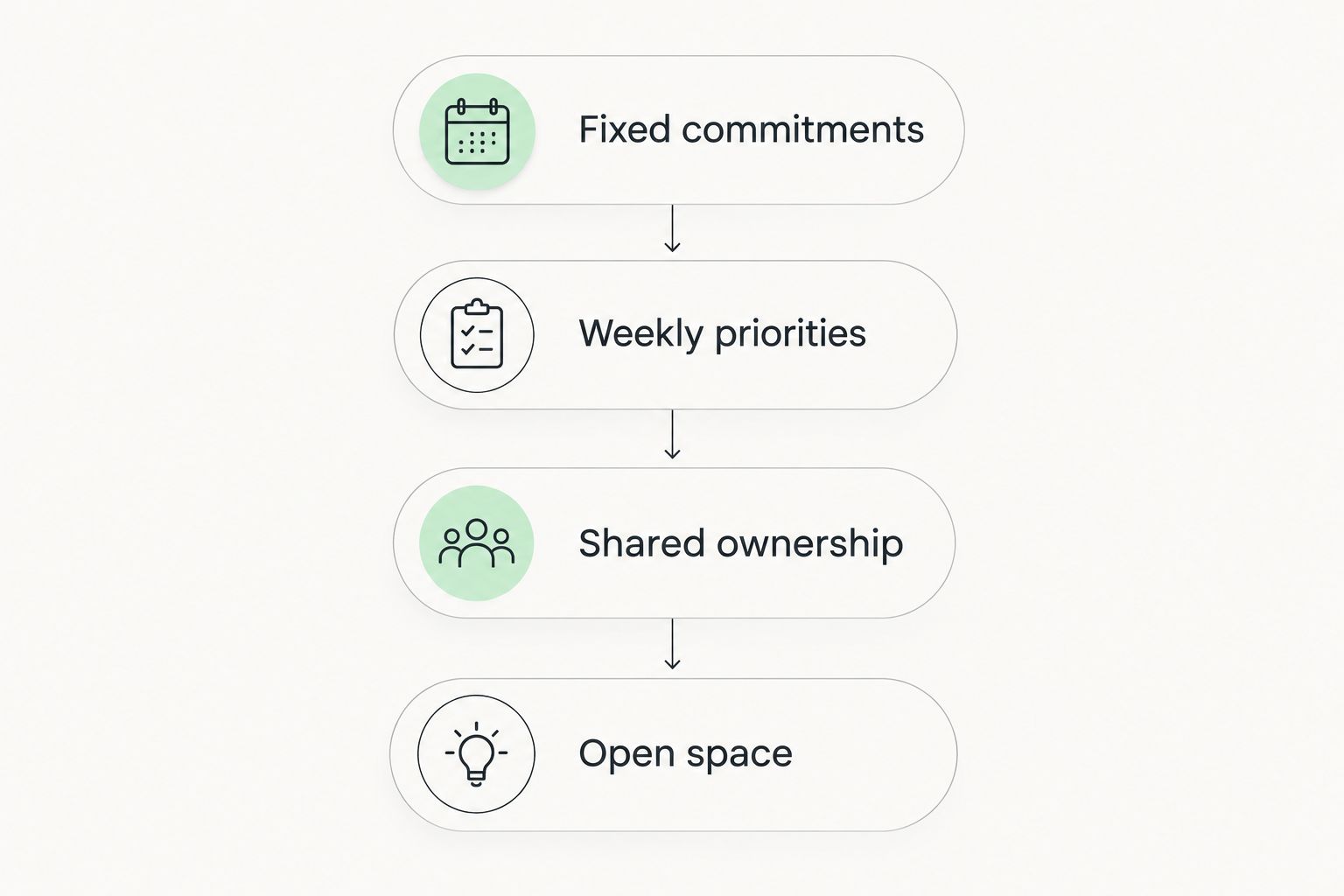
Use this sequence to set up your first week:
- Fixed commitments: Add events that already have dates or times.
- Weekly priorities: Write the tasks that deserve deliberate attention.
- Shared ownership: Name the person responsible for household actions.
- Open space: Leave room for changes and unplanned needs.
Set a 10-minute timer for the initial setup. At the end of a day, allow a 2-minute check to move or remove unfinished tasks. Use a 5-minute review at the end of the week to decide which sections earned their space; these are starting limits, not productivity targets.
The Sheema Edit's combination of printable planning resources and personal essays fits readers who want both practical organization and relatable lifestyle content. Choose the page for its function, then use the writing as a separate source of reflection.
FAQ
What's the best printable weekly planner for busy moms?
An undated priorities planner is the best default when you need a weekly overview without scheduling every hour. Choose a time-block planner instead when fixed appointments drive your week.
Should I choose a dated or undated weekly planner?
Choose an undated weekly planner if you want to start at any point and leave unused weeks out. Choose a dated layout if prefilled dates are more useful to you than that flexibility.
Is a family planner better than a personal weekly planner?
A family planner is better for comparing several people's commitments; a personal weekly planner is better for your own priorities. Use the format that answers the question you need to check most often.
What should I put on my weekly planner?
Start with fixed commitments, weekly priorities, and responsibility for shared tasks. Add meals or preparation notes only when those sections help you make decisions.
How do I plan a week when my energy changes?
Separate essential commitments from flexible tasks and leave room to revise the plan. An energy-aware layout supports organization, but it does not replace medical advice or treatment.
Can I print a weekly planner in black and white?
Use a template that remains readable without color and check the result with a test print. Labels and clear boundaries should distinguish sections without relying only on colored boxes.
What does The Sheema Edit offer for moms who like planning?
The Sheema Edit offers printable journals and planners alongside personal essays on motherhood, mental wellness, and chronic illness. Choose a planning resource according to the layout and purpose you need.
One last thing
Do not automatically copy every unfinished task into next week. Decide whether to schedule it, share it, simplify it, or remove it. A planner stays useful when it records current decisions—not every intention you have ever written down.