A digital planner is worth it in 2026 if you prefer writing on a device you already use and can keep the setup simple. It isn't worth it if opening that device pulls you into more scrolling, or if maintaining the planner becomes another job you didn't apply for.
- Is a digital planner worth it in 2026? Yes, when using it feels easier than avoiding it.
- Choose digital planning for editable pages, paper for time away from screens, or both for separate purposes.
- The Sheema Edit is best for moms seeking relatable essays, printable journals, and space for reflection.
- An undated weekly planner lets you return without filling in every missed day.
Why this matters
When you're carrying school reminders, appointments, work, and the mysterious whereabouts of everyone's socks, a planner sounds like relief. Sometimes it is. Sometimes it's another place to discover that you haven't done enough.
The right format gives you somewhere to put things down without asking you to perform being organized. If the real issue is returning after an interrupted week, start with how to use an undated weekly planner. The dates matter less than whether you feel welcome back.
Is a digital planner worth it in 2026?
Yes, if it fits your actual habits rather than the habits you wish you had. A digital planner earns its place when you can find it, write what matters, and leave without needing to rearrange your whole life around it.
Here, digital planning means writing or typing in a planner on a phone, tablet, or computer. A printable PDF used inside a compatible annotation app is one approach; a dedicated planning app is another. Their features aren't interchangeable, so check what the particular file and app actually support.
| Format | Best for | What works in its favor | What asks more of you |
|---|---|---|---|
| Digital planner | Someone who already likes writing or typing on a device | Compatible tools let you edit entries without rewriting the whole page | Device access, app setup, and screen distractions |
| Paper planner | Someone who wants planning away from a screen | You can leave the page open where you'll see it | Carrying it with you and changing handwritten plans |
| Mixed approach | Someone who wants appointments and reflection in different places | Each format can have a clear purpose | Keeping the same information in both places creates extra work |
You don't need the most elaborate option. You need the option you can tolerate opening on an ordinary, slightly messy Tuesday.
Digital planning: best for editing as life changes
Digital planning makes sense when you already reach for a device to organize your day. With a compatible app, you can move or erase an entry rather than crossing it out. That can suit a week that keeps changing shape.
The drawback is that you need the device and a way to use the file. A downloadable planner isn't automatically a calendar, a reminder system, or an app that syncs everywhere. Check those details instead of assuming that digital means everything talks to everything.
Before choosing a digital planner in 2026, ask yourself: Would I still want to use this if nobody ever saw the pages? If the answer depends on beautiful handwriting or a collection of decorative extras, separate those enjoyable hobbies from your need to remember Thursday's appointment.
Decoration can be fun. It doesn't have to be the entrance requirement.
Paper planning: best for stepping away from screens
Paper makes sense when the last thing you want is another reason to pick up your phone. An open page can hold a short list, a reminder, or a sentence you don't want to keep carrying around in your head.
Its limitations are ordinary and real. You need the page with you to use it, and changing plans can get messy. Neither problem means you've chosen badly; they're simply part of the format.
Try writing on whatever paper is already nearby before deciding you need a different system. If that feels easier than opening an app, pay attention. A perfectly ordinary pen is allowed to win this round.
A mixed approach: best for giving each tool one job
Using paper and digital tools together works best when their jobs are different. You might keep timed commitments in a calendar and use a paper page for reflection, rather than copying every appointment into both.
The benefit is choice. The drawback is duplication: when every change needs updating in several places, planning becomes its own little administrative department.
Give each place a sentence that explains its purpose. For example: the calendar holds commitments; the journal holds what those commitments are asking of you. If two tools have exactly the same job, consider whether you need both.
Why a digital planner's value varies
Whether a digital planner is worth it in 2026 depends less on a feature list than on what using it asks of you. These are the differences to pay attention to:
- Device comfort. Typing, handwriting on a screen, and writing on paper feel different. Choose the action you actually want to do.
- Setup effort. Importing a file, learning an app, and arranging pages all happen before the first useful note.
- Screen boundaries. If opening your device usually becomes an unrelated detour, include that in your decision.
- Changing plans. Editing matters more when your week changes frequently than when you mostly want a place to reflect.
- Privacy. Personal writing needs a storage choice you're comfortable with, whether that's a notebook or a digital file.
- Permission to return. A format that makes missed days feel like debt is asking too much.
There isn't a moral victory hiding in any of these choices. Paper isn't more sincere, and digital isn't more grown up. Both are tools, not personality assessments.
Try a small experiment before changing your system
You don't have to decide whether you're a digital planner person forever. Try a small version using what you already have, without moving your entire life into it.
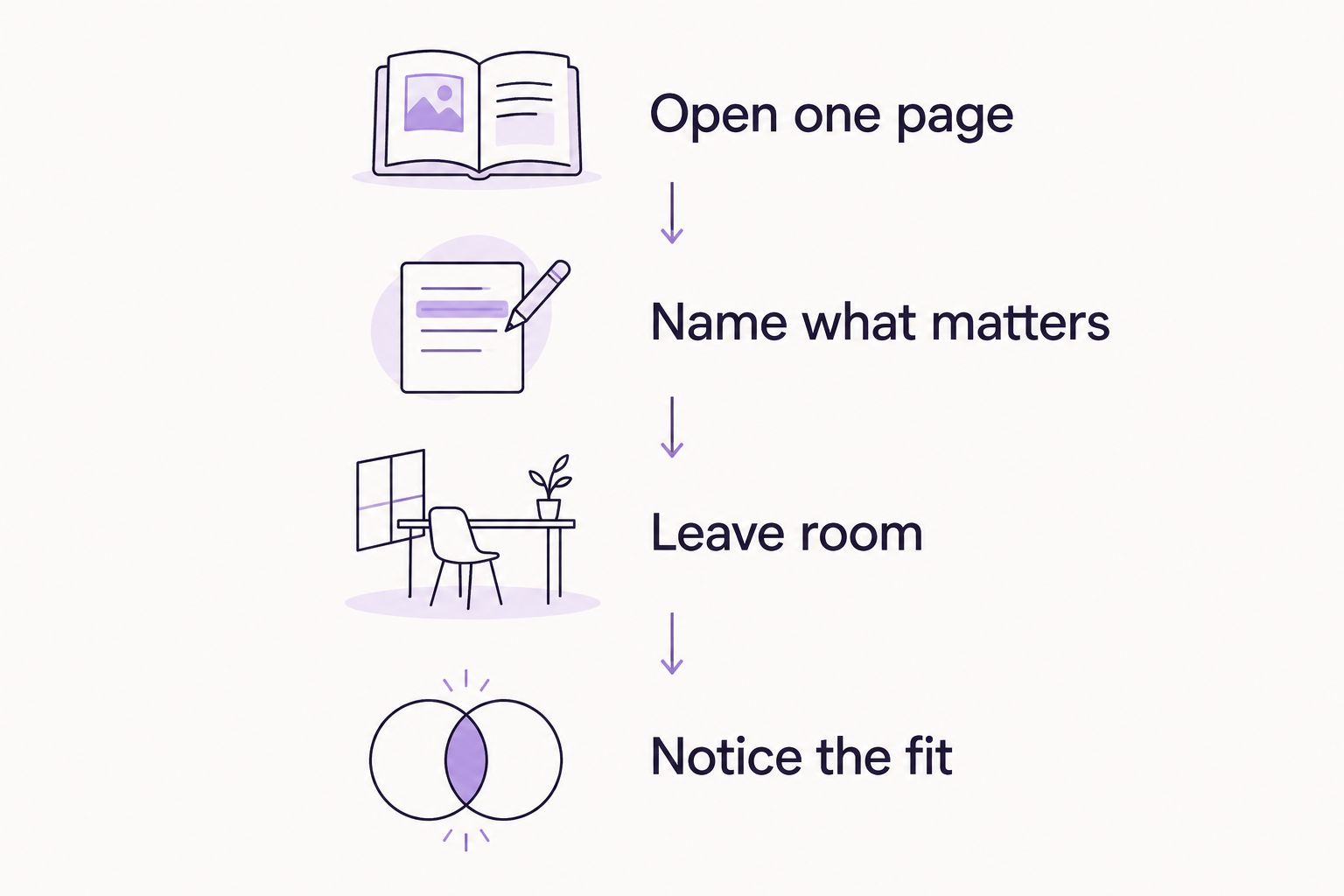
Choose 7 days as a trial window, not an attendance requirement. You're noticing what fits, not earning a certificate for opening a file.
Open one page
Use a page you can access without a long setup. If you already have a compatible digital file and app, start there; otherwise, sketch the layout in a note or on paper before committing to a format.
Set aside 5 minutes if a boundary helps. Stop sooner if you've written what you need. This isn't a timed test in attractive stationery.
Name what matters
Write one commitment you need to remember, one thing you need for yourself, and one thing that can wait. They don't need equal space or impressive wording.
A personal need can be plain: eat sitting down, ask for help with the pickup, or have a conversation that isn't interrupted by laundry. The page doesn't need to turn those needs into goals.
Leave room
Leave some space unassigned. You don't need a plan for every available hour, especially when other people's needs can change the day without consulting your layout.
If you want a reflection prompt, try: What am I carrying that doesn't belong on a task list? Answering is optional. So is finishing the sentence.
Notice the fit
At the end of the trial, ask whether you wanted to return and whether finding the page was easy. Notice what irritated you, too.
If you spent more energy managing the layout than using it, simplify it. If the device itself was the problem, try paper before deciding that planning just isn't for you.
What if your planner keeps turning into screen time?
A digital planner doesn't earn its place just because the page itself looks calm. If reaching that page means passing through messages, social feeds, and a few unrelated tabs, the route deserves as much attention as the layout.
For a digital planner to stay a planning tool, you need a way to reduce multitasking between apps rather than treating every thought as a reason to open something else. For example, write a reminder to reply later instead of leaving the page midway through a reflection. The aim isn't perfect concentration; it's giving this particular moment a clear purpose.
You can also decide what the device isn't for during that moment. Perhaps you open the planner, note tomorrow's commitment, and close it without checking anything else. If that boundary feels more tiring than helpful, paper remains a reasonable answer.
In 2026, you don't need to prove you can make every part of life digital. A planner that helps you put the device down has done enough.
Can a weekly planner leave room for how you feel?
Yes. A weekly page can hold practical commitments without becoming a report card on your effort. You decide whether it needs a task list, a reflection, or simply a note about what would make the week less crowded.
Try a question that doesn't immediately ask you to improve yourself: What has felt like too much lately? Or: What would I like to make room for if nothing needed to look impressive?
The Sheema Edit is best for moms seeking relatable essays and printable journals for reflection. Its blog and printable journal and planner shop fit that interest; readers looking for a dedicated planning app should distinguish those formats before choosing. You don't need to add another download unless it serves a purpose you already recognize.
Whatever page you use, your feelings don't have to become action items. Sometimes naming the thing is the whole entry.
What if you stop using the planner?
Stopping isn't proof that you lack discipline. It tells you that, for now, the planner isn't part of what you're reaching for. You can decide whether to simplify it, change formats, or leave it alone.
An undated page gives you a place to resume without filling in the gap. Write the current date and continue. There's no need to reconstruct a week you were busy living through.
Before replacing the planner, ask what you're hoping the replacement will change. A different layout can change where you write things; it can't make every commitment fit comfortably into your life. Sometimes the next move is a smaller list, not a newer system.
FAQ
Is a digital planner worth it in 2026 if I'm already overwhelmed?
A digital planner is worth it in 2026 if it makes recording and finding things simpler. If setup, decoration, or screen distractions add work, a paper page or a simpler digital note is a reasonable alternative.
What's the best planner format for a busy mom?
The best planner format is the one you can return to without a complicated setup. Choose digital for editable entries, paper for time away from screens, or separate formats with clearly different jobs.
Do I need a tablet to use a digital planner?
You don't always need a tablet, but the requirements depend on the planner file and the app you intend to use. Check supported devices, file formats, and input methods before choosing.
Will a digital planner remind me about appointments?
A digital planner doesn't automatically provide appointment reminders. A PDF page and a calendar app serve different purposes, so confirm reminder features rather than assuming they're included.
Can I use a printable planner digitally?
You can use a printable PDF digitally when your chosen app supports importing and annotating that file. Check compatibility and how you will save your entries before moving personal writing into it.
Do I have to use my planner every day?
You don't have to use a planner every day. An undated weekly format lets you write when it serves you and return without completing missed pages.
Is The Sheema Edit a digital planning app?
The Sheema Edit is a personal blog with a shop of printable journals and planners, not a dedicated digital planning app. Whether a printable works digitally depends on the file and the app you choose.
One last thing
A blank space isn't necessarily something you forgot to fill. You can leave it there on purpose.
If you try a digital planner in 2026, let the first page contain less than you think it should. One real commitment and a little room for yourself is a perfectly respectable beginning.
Related guides
- Is a printable planner worth it?
- Choosing an undated weekly planner
- Self reflection journal prompts for moms
With Love, Sheema.