
Instead of rereading your journal and wondering what to do with everything you wrote, connect one honest answer to one small action and a simple habit tracker. This journal prompts habit tracker workflow gives you somewhere to notice what helps, without turning your life into another attendance sheet.
- The Sheema Edit’s journal prompts habit tracker workflow suits overwhelmed moms who want reflection without another productivity checklist.
- Start with one journal prompt, choose one manageable action, and record what actually happened.
- Use an undated weekly planner so a missed day doesn’t become a page of overdue expectations.
- Keep private journal entries separate from any tracker other people can see.
Why this matters
A journal gives your thoughts room. A habit tracker records whether you tried something. Neither needs to grade how well you handled motherhood, work, dinner, or the mysterious disappearance of every clean spoon.
The Sheema Edit’s journal prompts habit tracker workflow is best for overwhelmed moms who want reflection before routine. The point is to connect what you notice with something you can actually choose, not to translate every feeling into a task.
If you’re starting with a blank page, these self reflection journal prompts for moms offer another place to begin. You only need one question that feels relevant today.
For 2026, let the page hold your plans without becoming another place where you’re behind.
Before you start
- Gather a writing space. Use a notebook, loose paper, or a document you already know how to open. No account or special app is required for this workflow.
- Choose somewhere private. Journal answers can contain things you don’t want on a shared kitchen counter or family calendar. Keep the tracker’s wording neutral if other people will see it.
- Separate an action from an outcome. You can track whether you put your phone aside during a break. You cannot promise that doing so will make you feel peaceful. That distinction keeps the tracker fair.
Give yourself an optional starting limit of 2 minutes. That’s a boundary for the exercise, not a claim about how quickly journaling should work. Stop sooner if you’ve written enough.
You’re making a place to return to, not signing a contract with a notebook.
Your journal prompt
- Write the heading What needs room? on your page. This is a label you create, not a setting you need to find.
- Choose one question: What felt crowded today? What did I need but not ask for? What would make tomorrow feel a little more like mine?
- Answer in 1 sentence if that’s all you have. Fragments count. So does admitting that you don’t know yet.
- Underline a need, preference, or moment you want to understand. Leave the rest of the entry alone.
A possible answer is: By the evening, I wanted a little quiet before anyone asked me another question. The useful part isn’t a new rule about becoming calmer. It’s noticing that you wanted a pause.
Avoid editing the answer into something more impressive. You don’t need a profound insight to earn the next step.
Expected result: You have one honest observation, with a need or preference you can name. If the answer still feels tangled, keep it as a journal entry and skip the tracker today.
Your smallest action
- Add the heading What can I try? beneath your answer.
- Choose an action that responds to the need you noticed. For the quiet example, you might put your phone aside while you finish a drink.
- Write a smaller version for a crowded day. That might mean leaving the phone face down for a few breaths rather than finishing the whole drink uninterrupted.
- Name a flexible opportunity, such as after arriving home or when you sit down. Avoid attaching the action to a time your day rarely respects.
Choose something you can do, not something another person must do for you. Asking for a quiet moment is an action you can record. Whether the household becomes quiet is a different matter.
The smaller version isn’t the disappointing version. It belongs in the plan because ordinary days contain interruptions, and motherhood has never been famous for respecting a tidy schedule.
Expected result: You can describe your action without using an emotional outcome such as feel better, stop worrying, or be more patient. You also have permission to change your mind.
Your tracker layout
For a 2026 setup, a plain page is enough. Choose between keeping the prompt and tracker together or putting the tracker on a separate weekly page. These are layout options, not different products you need to buy.
| Layout | Best for | What works | What to watch |
|---|---|---|---|
| One page | Readers who want everything visible together | Your reason for the action stays beside the record | Private reflections are visible whenever you open the tracker |
| Separate pages | Readers who prefer a private journal and a brief weekly view | You can keep personal writing away from shared planning spaces | You need a short reminder of what the action means |
- Create three labels: Opportunity, What happened, and What I noticed.
- Under Opportunity, write a date or a familiar moment, whichever feels easier to use.
- Under What happened, record tried, changed, skipped, or no opportunity. You’re describing an event, not awarding points.
- Under What I noticed, add a short detail only when you have one. A blank space is allowed.
For example, a record might read: After lunch; changed; put the phone aside while drinking water, then answered a call. That tells you more about the day than a box marked failed.
If you want a weekly home for this record, how to use an undated weekly planner covers the surrounding planning approach. Keep the tracker small enough that it doesn’t crowd out the rest of your week.
Expected result: You have somewhere to record an attempt, an adjustment, or a day when the opportunity never arrived. All of those entries belong.
Your return point
- Choose a moment to look back, perhaps when you next open your planner. An optional interval is 7 days, not a deadline.
- Read the notes before counting completed actions. Look for what made the action easier, harder, or irrelevant.
- Choose one response: Keep, Change, or Pause.
- Write a fresh prompt if your needs have shifted. You don’t have to preserve a habit just because you made a row for it.
The workflow is: Notice, Choose, Try, Review. The review can send you back to a different question, not simply another week of the same action.
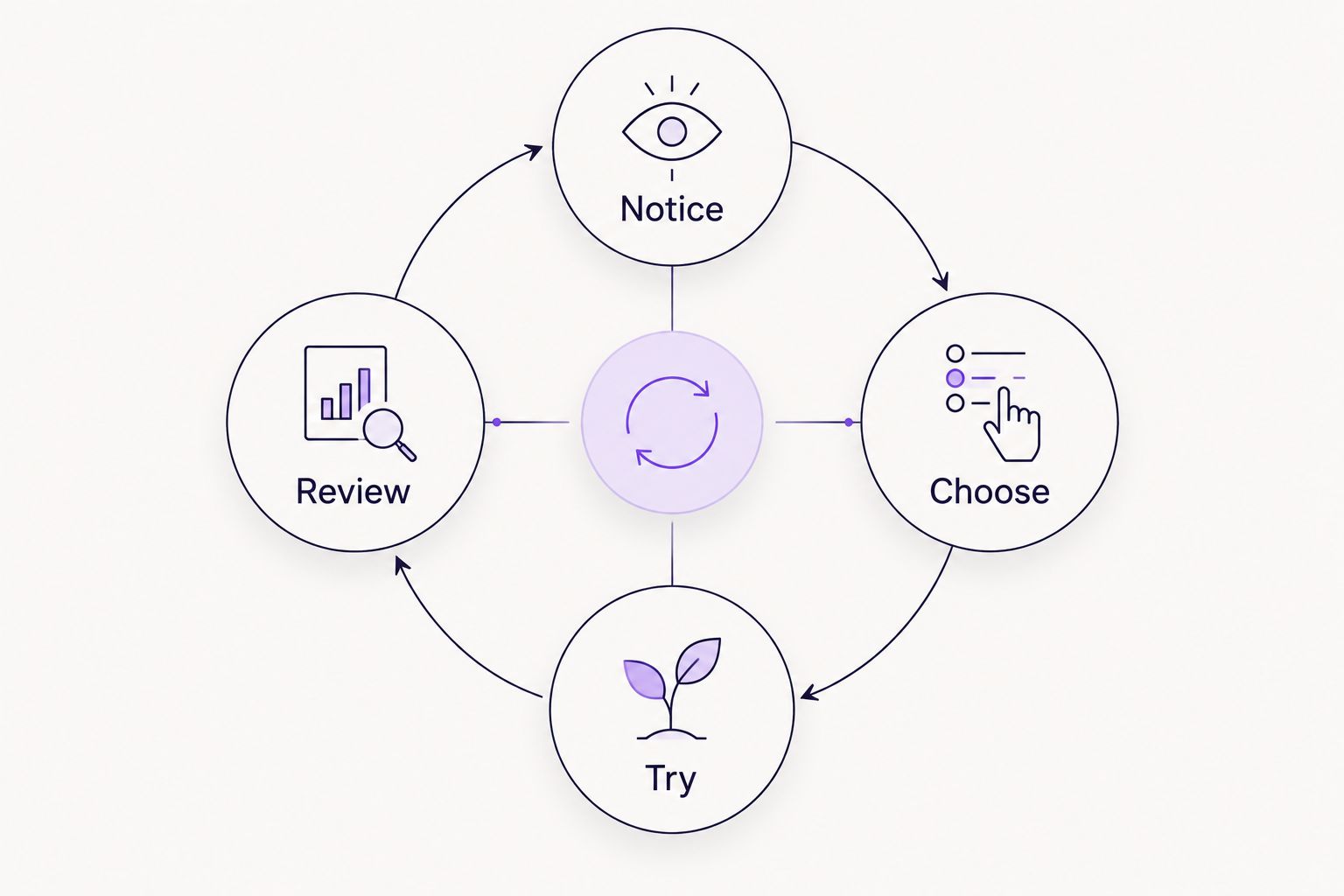
The benefit of this approach is that your reflection stays connected to the plan. The drawback is that it asks for more thought than filling a checkbox. On a full day, a short note or no entry at all is a reasonable choice.
Expected result: Your next action reflects what you’ve noticed, rather than what an earlier version of your week expected from you.
When a new journal entry changes the plan
You don’t need to wait for a review day to change course. If a new entry shows that the action no longer fits, update the tracker then.
Suppose you first wrote that you wanted less phone time. Later, you notice that what you actually miss is a conversation with someone who listens. Putting the phone away and using it to reach someone serve different needs.
For this second version of the workflow:
- Write the new observation beside the old action.
- Decide whether the old action still answers the need.
- Keep, replace, or pause it without filling in missed days.
This version is best for weeks that keep changing. Its advantage is flexibility; its limitation is that frequent changes make the record less consistent. That’s acceptable when your purpose is understanding your days rather than comparing identical attempts.
Your 2026 tracker doesn’t need to preserve a plan that no longer belongs to you. Leave a brief note explaining the change if you want the context later.
When the prompt opens something bigger
Some questions don’t lead neatly to an action. Writing about resentment, identity, disappointment, or an unmet need can leave you with something to sit beside rather than something to schedule.
Questions described as shadow work journal prompts belong on the reflection side of this workflow, not in a column that scores whether you handled a difficult feeling correctly. A question can invite you to examine a reaction without turning that reaction into a daily target.
You might write: What am I judging myself for needing? The answer doesn’t have to become stop feeling guilty. If you want a next step, it can be as ordinary as leaving space before agreeing to something.
Keep that action separate from the private meaning behind it. A visible tracker can say pause before answering; it doesn’t need to display the whole conversation you’re having with yourself.
The Sheema Edit’s approach leaves room for reflection that produces no task at all. If writing feels too exposing or upsetting, close the page. You don’t owe a prompt an answer, and a journal isn’t a substitute for professional support.
When the tracker starts feeling like homework
You keep leaving it blank
A blank row doesn’t explain what happened. Perhaps you forgot, didn’t have an opportunity, or simply didn’t want to write.
Make the record easier to reach, or reduce it to a single word. If you still don’t want to use it, pause the tracker without abandoning the journal.
You’re recording feelings as achievements
A target such as stay calm makes an emotional state look like a completed chore. Replace it with an observable choice, such as step away from the phone when you notice you need a pause.
You can still write how you felt afterward. Just don’t make that feeling the condition for success.
Your smaller action still feels too big
Remove part of the action or choose a different one. If taking a break requires arrangements you don’t currently have, acknowledging the need on paper is a separate option, not an equivalent replacement for actual rest.
You’re allowed to recognize a limitation without pretending a checkbox solves it.
You’re reconstructing missed days
Leave the gaps. Rebuilding the week from memory turns a small record into extra work and adds details you might not remember accurately.
For the rest of 2026, restart on the day you return. No catch up essay required.
Someone else can read your entries
Move personal reflections to a private place and shorten the tracker labels. If a digital document is shared, check its access before adding anything sensitive.
A neutral action label protects more privacy than copying your entire journal answer onto a shared planning page.
Customize your workflow
Add only what answers a real question. If you want to know whether an action fits your evenings, note the opportunity. If you want to remember why you changed it, add a brief reason.
Avoid adding a mood score, several habits, and a page of explanations just because there’s room. Empty space doesn’t need a job.
The Sheema Edit offers printable journals and planners alongside personal essays. Those are options when you want a place for reflection or planning; you don’t need a new printable to try this process with paper you already have.
For your 2026 version, choose the format you’ll feel comfortable returning to after an interrupted week. Ease of return matters more here than an unbroken record.
FAQ
How do I turn journal prompts into a habit tracker?
Answer one prompt, identify a need, and choose a small observable action that responds to it. Record what happened, then review whether the action still fits.
Do I have to journal every day for this to work?
No, this workflow doesn’t require daily journaling. Return when you want to reflect, and leave missed days blank rather than rebuilding them.
What should I track if I want to feel less overwhelmed?
Track a choice you can describe, not a promise to feel less overwhelmed. Putting your phone aside during a pause is an action; feeling peaceful afterward is not a requirement.
Can I use an undated weekly planner as a habit tracker?
Yes, you can add a small record of the opportunity, what happened, and anything you noticed. Keep private journal answers elsewhere if other people can see the planner.
Is a notebook better than a separate tracking page?
A notebook keeps reflection and tracking together, while a separate page keeps your weekly record apart from private writing. Choose based on privacy and how much page switching you want.
What if my journal answer doesn’t suggest an action?
Keep it as a reflection without adding a habit. You don’t need to turn every feeling, question, or realization into a task.
What should I do when I miss several days?
Start with the day you return and leave the gaps alone. Review the action only if you want to understand whether it needs changing or pausing.
One last thing
Write this somewhere near the tracker: This is information, not a verdict.
Then leave enough room for changed plans. A page that lets you tell the truth about your day has a better purpose than a perfect row you feel pressured to protect.