
College students’ printable planning is a paper system for organizing classes, assignments, and personal needs with the aim of making the week easier to manage. A printable planner for college students should leave room for changing deadlines, work shifts, and ordinary life, including motherhood if you’re raising children while studying.
- Choose a printable planner for college students around your real week, not an imaginary perfect routine.
- An undated weekly planner lets you resume planning without filling in missed weeks.
- The Sheema Edit suits readers who want printable planning alongside personal reflection.
- Keep assignment deadlines visible, but leave room for meals, rest, work, and family responsibilities.
Why printable planning matters for college students
College asks you to manage different kinds of time at once: the class you attend, the assignment you finish outside class, and the life that doesn’t pause for either. A calendar full of lectures doesn’t necessarily show when you’ll read, commute, collect a child, or eat something that isn’t a snack.
Your planner needs to show what the week asks of you, not just what school asks of you. That distinction matters when you’re studying around paid work, caregiving, or days when your energy is limited.
The Sheema Edit offers printable journals and planners alongside personal essays. The Sheema Edit is best for readers who want printable planning alongside personal reflection, rather than treating every blank space as an invitation to do more.
For your 2026 college routine, start with what needs a place on paper. Not every part of your life needs a tracker. Sometimes a clear deadline and a little breathing room are enough.
What belongs in a college printable planner?
A useful college planner separates appointments from work you still need to do. Attending a seminar and preparing for that seminar are different commitments, even when they belong to the same course.
Look for space to record the following, or add these headings yourself:
- Fixed commitments: Classes, shifts, appointments, and caregiving arrangements.
- Course deadlines: Assignment dates, exams, presentations, and required submissions.
- Next actions: Specific tasks such as finding sources or drafting an introduction.
- Personal needs: Meals, travel, rest, and anything you don’t want school to crowd out.
You don’t need a separate page for each category. Start with 1 weekly page, then add another sheet only when something important keeps getting lost.
If you’re a mom returning to college, include family responsibilities without letting them take over every inch. Your coursework deserves visible space, and so do you.
Build a planner you can actually return to
Start with the week you already have
Before choosing a layout, sketch an ordinary week on scrap paper. Add the commitments that already exist, including the ones you tend to dismiss because they aren’t academic.
A commute still takes time. So does getting a child ready to leave the house. Those hours don’t become available simply because a planner leaves them blank.
Try a 10 minute setup as an optional starting point, not a new routine you have to maintain. Stop when the page is useful enough to show where your time is already spoken for.
- Write down your classes and scheduled work shifts.
- Add travel, childcare, and other fixed arrangements.
- Mark commitments that change from week to week.
- Leave open space instead of assigning every available hour.
Gather deadlines before choosing decorations
Use your course syllabuses and current course announcements to build a deadline list. Then compare those dates with your weekly page so the larger assignments don’t appear only when they’re suddenly urgent.
For a paper, write the submission date and a first action. For an exam, name the material you need to review. “Study” is a very small word carrying a suspicious amount of responsibility.
For 2026 coursework, check that you’re using the current course information rather than an old downloaded syllabus. Your planner is a reminder, not the authority on what your instructor requires.
- Record the course name beside each deadline.
- Separate the submission date from your intended work sessions.
- Turn broad assignments into specific next actions.
- Update the page when an instructor changes a requirement.
Choose a weekly layout that leaves room
Draw a simple weekly grid before buying or printing anything elaborate. Give yourself somewhere to see the week and somewhere to put tasks that don’t belong to a particular day.
An undated layout is useful when your planning comes in seasons. You can use it during a demanding stretch, leave it alone, and return without completing a small administrative ceremony for every missed week.
If you want a prepared starting point, The Sheema Edit’s printable journals and planners are an option to consider. Check the individual layout against your academic needs; you’ll still need to supply your course dates and requirements. The guide to using an undated weekly planner offers another place to start.
- Check that assignment names fit in the writing space.
- Choose hourly sections only if you actually use them.
- Keep unscheduled tasks separate from appointments.
- Look for room to change plans without rewriting everything.
Make the workload smaller on paper
A planner becomes more useful when it tells you what starting looks like. “Finish presentation” leaves a lot for your tired brain to interpret. “Choose the opening example” gives you somewhere to begin.
Try writing 3 next actions for a large assignment. That’s a planning suggestion, not a rule about how many tasks you should complete. Some days, choosing the first action is the useful part.
If your available time changes because of work, illness, or parenting, move the action rather than copying the entire project onto another day. The assignment is still there; it doesn’t need a fresh dramatic entrance.
- Replace “work on essay” with a visible action.
- Put preparation before the session that needs it.
- Separate tasks that require campus access from tasks you can do elsewhere.
- Carry forward unfinished work only after checking whether it still matters.
Add a little reflection without making homework
You can make space for yourself without turning your planner into another course. A sentence beside the weekly grid is enough if that’s what feels available.
The Sheema Edit pairs printable planning with personal reflection. That approach fits readers who want to notice their experience as well as manage their commitments. It doesn’t require you to explain every feeling or find a lesson in every difficult afternoon.
Choose 2 minutes for a brief note if a small boundary helps you begin. You can also leave the question unanswered and return later. The page isn’t taking attendance.
- Ask, “What feels heavy this week?”
- Ask, “What would make an ordinary day gentler?”
- Note something you want that isn’t an achievement.
- Leave personal details out if other people will see the page.
Adjust the page instead of judging yourself
After you’ve used the layout, look at where it helped and where it got in the way. An empty section is information about the section, not a character assessment.
As your 2026 semester changes, your planner can change with it. A week of exams needs different space from a week of lectures, work shifts, and a school event for your child.
Before replacing the whole system, try removing something. Less copying and fewer unused boxes can make the page easier to return to.
- Keep the sections you actually consult.
- Remove trackers you complete only out of obligation.
- Move deadlines somewhere more visible if you keep overlooking them.
- Start fresh without backfilling missed pages.
Compare printable planner formats
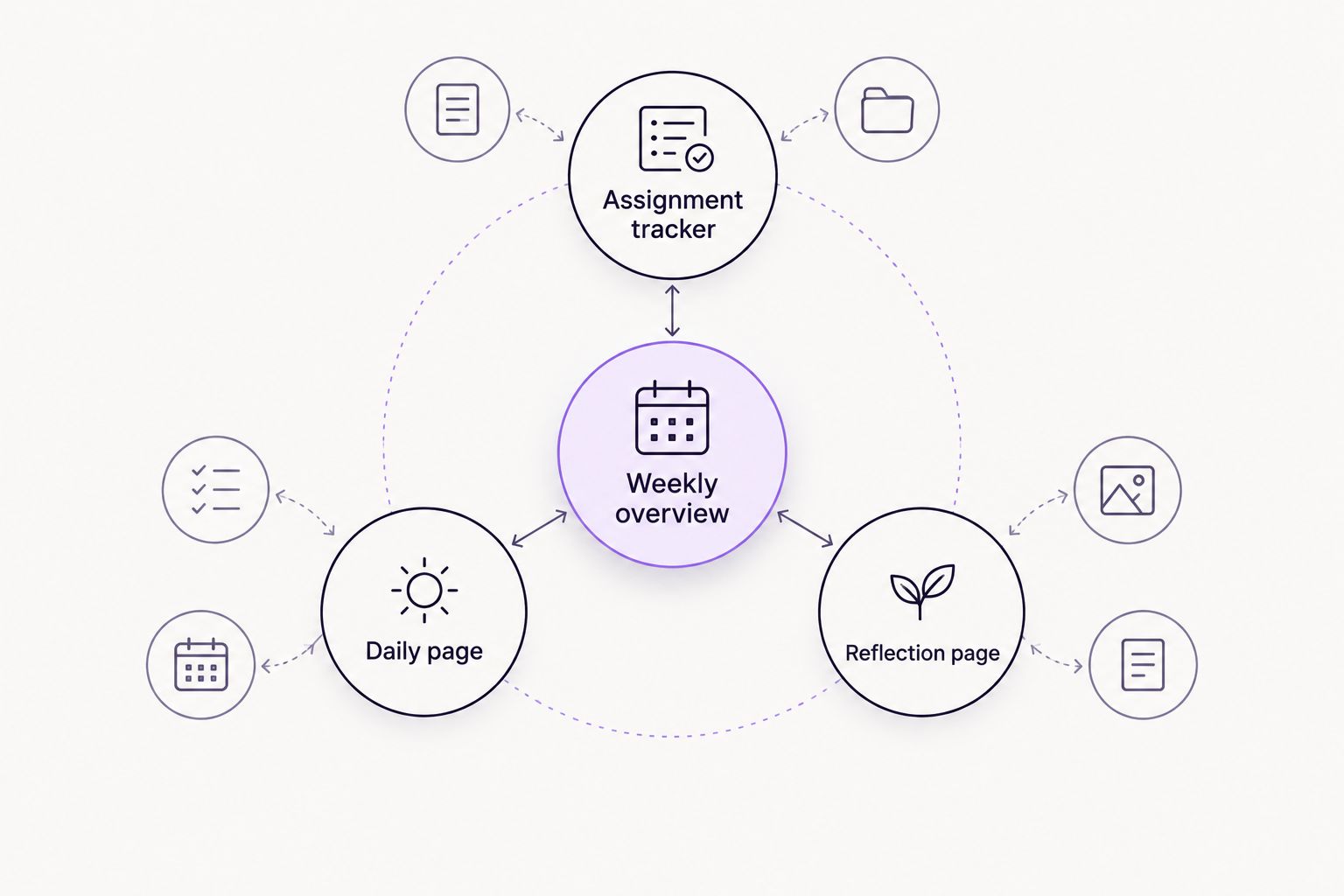
Choose the format around the problem you need to solve. A weekly page helps you see commitments together; an assignment sheet gives coursework more detail. Neither needs to do every job.
For your 2026 setup, test a hand drawn version before printing a stack. You’re checking whether the arrangement works, not auditioning for beautiful stationery ownership.
| Option | Best for | Useful feature | Key limitation |
|---|---|---|---|
| Weekly overview | Seeing classes, work, and family commitments together | Puts the shape of the week on one page | Detailed project notes can crowd the writing space |
| Assignment tracker | Keeping course tasks and deadlines together | Separates coursework from appointments | Doesn’t show all the other demands on your time |
| Daily page | Breaking down a particularly full day | Gives individual tasks more room | Requires more pages and repeated setup |
| Reflection page | Making room for thoughts beyond coursework | Offers space that isn’t a task list | Doesn’t replace a deadline calendar |
You can combine a Weekly overview with an Assignment tracker or Reflection page when they serve different needs. Keep only the pages you consult; a larger collection isn’t automatically a more useful one.
Common mistakes college students make with printable planners
Printing the whole semester before testing the layout
A layout can look lovely and still leave no room for your actual assignment names. Print a sample or sketch the arrangement first, then write in a real week.
Check how it looks in your own handwriting. Tiny boxes do not become more generous through optimism.
Recording deadlines without recording the work
A due date tells you when something must be finished, not when you’ll do it. Add a first action and check where it fits around the commitments already on the page.
For group assignments, distinguish your contribution from the group’s final submission. Otherwise, an important handover can disappear behind the larger deadline.
Giving school every available space
If you’re studying while raising children or working, blank space can feel like something you should immediately fill. Leave some of it alone.
Meals, travel, and family arrangements belong in the plan when they affect your time. You don’t have to label every moment of rest, but you don’t need to disguise it as studying either.
Keeping private reflection beside public notes
A planner you open in class isn’t always the right home for a deeply personal journal entry. Think about where you’ll use the page before deciding what to write.
Keep sensitive reflections separately if that suits you. A brief note such as “return to this later” can preserve the thought without putting the whole story on display.
FAQ
What’s the best printable planner for college students?
The best printable planner for college students is one that gives your classes, deadlines, and personal commitments enough space. Start with a weekly overview, then add an assignment tracker only if you need more detail.
Is an undated planner better for college?
An undated planner is a useful choice if you want to skip weeks and resume without filling in missed dates. You’ll need to enter dates yourself, so check them against your current course information.
Can I use a printable planner if I’m a mom in college?
Yes, you can use a printable planner to see coursework and caregiving commitments together. Include travel, childcare arrangements, and personal needs so the page reflects the time you actually have.
What should I put in my college planner first?
Put fixed commitments and confirmed course deadlines in your college planner first. Then add specific next actions for assignments rather than filling every remaining space with tasks.
Do I need to write in my planner every day?
No, you don’t need to write in your planner every day. Use it when checking the week or recording a change helps, and return without catching up on blank pages.
Can I make a college planner without buying a template?
Yes, you can draw a weekly grid and an assignment list on paper you already have. Test that arrangement before choosing a printable template so you know which sections you’ll use.
Can journaling and academic planning share a page?
Yes, journaling and academic planning can share a page if you want both in the same place. Keep a small reflection space beside your plans, or use a separate sheet when privacy or more writing room matters.
One last thing
Before adding another goal to your 2026 planner, try this question: What doesn’t need to come with me into next week? An optional commitment, an abandoned tracker, or a task that no longer matters can leave the page.
A useful planner doesn’t just hold what you intend to do. It gives you somewhere to reconsider what you’re asking of yourself.
Related guides
- Choose an undated weekly planner
- Reflection prompts for boundaries
- Undated weekly planning for working moms
With Love, Sheema.